> ## Documentation Index
> Fetch the complete documentation index at: https://docs-dev-fix-ss-log-app-metadata-user-metadata-clarification.mintlify.site/llms.txt
> Use this file to discover all available pages before exploring further.

> Learn how to configure an update policy form using Forms for Actions for users to review and accept new terms of service or consent updates.

# Use Cases: Configure an update policy form using Forms

<Card title="Before you start">
  1. Create a [Machine-to-Machine Application](/docs/get-started/auth0-overview/create-applications/machine-to-machine-apps) with the following scopes enabled:

  * `read:users`
  * `update:users`
  * `create:users`
  * `read:users_app_metadata`
  * `update:users_app_metadata`
  * `create:users_app_metadata`

  2. Add a [Vault connection](/docs/customize/forms/vault) using the M2M application credentials.
</Card>

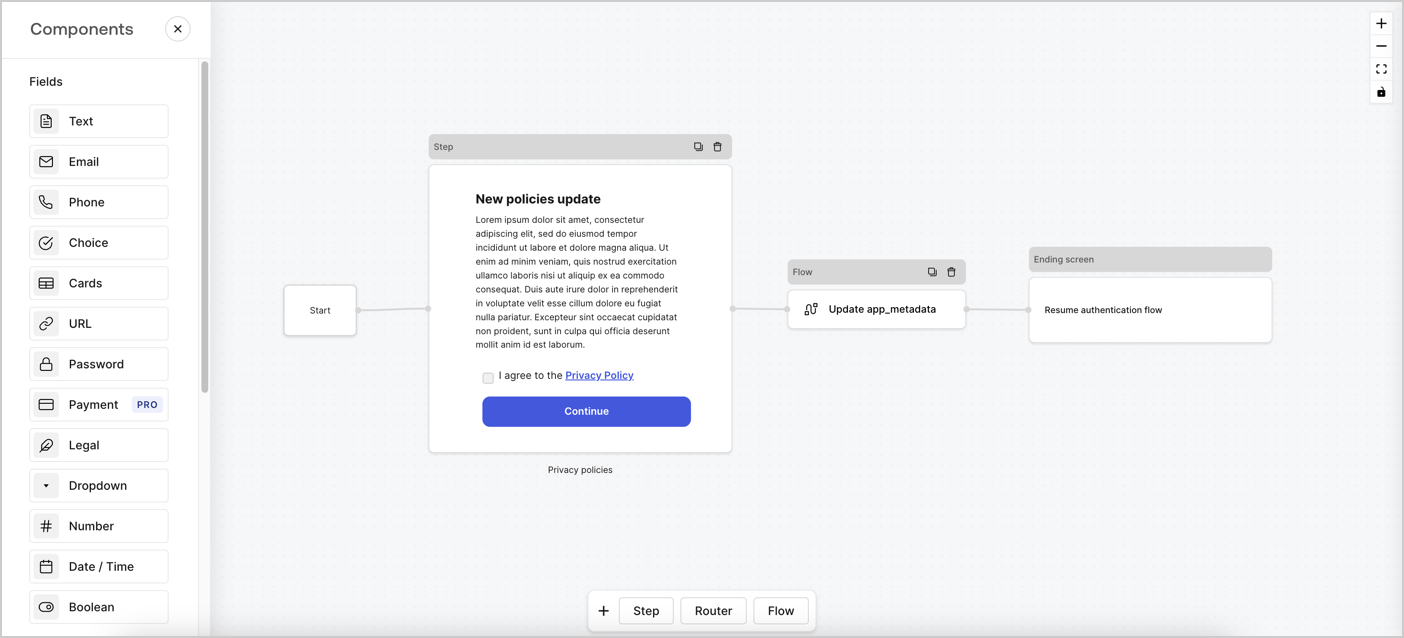
Forms for Actions allows you to create custom privacy policies flows and store the consent under the `app_metadata` object.
<Frame>
  <img src="https://mintcdn.com/docs-dev-fix-ss-log-app-metadata-user-metadata-clarification/kea7N-eir4Zjm6iz/docs/images/cdy7uua7fh8z/6i68dMvHDTijfRmSgN1x8Q/ad900e7d4c0fb34645921435472b8684/privavy-policy-form.png?fit=max&auto=format&n=kea7N-eir4Zjm6iz&q=85&s=75a70a5cfef6a7add920ebca6a99bc35" alt="Dashboard > Actions > Forms > Privacy policy use case" data-og-width="1404" width="1404" data-og-height="638" height="638" data-path="docs/images/cdy7uua7fh8z/6i68dMvHDTijfRmSgN1x8Q/ad900e7d4c0fb34645921435472b8684/privavy-policy-form.png" data-optimize="true" data-opv="3" srcset="https://mintcdn.com/docs-dev-fix-ss-log-app-metadata-user-metadata-clarification/kea7N-eir4Zjm6iz/docs/images/cdy7uua7fh8z/6i68dMvHDTijfRmSgN1x8Q/ad900e7d4c0fb34645921435472b8684/privavy-policy-form.png?w=280&fit=max&auto=format&n=kea7N-eir4Zjm6iz&q=85&s=f811b2c4ef8a68110d14e2be1d90079e 280w, https://mintcdn.com/docs-dev-fix-ss-log-app-metadata-user-metadata-clarification/kea7N-eir4Zjm6iz/docs/images/cdy7uua7fh8z/6i68dMvHDTijfRmSgN1x8Q/ad900e7d4c0fb34645921435472b8684/privavy-policy-form.png?w=560&fit=max&auto=format&n=kea7N-eir4Zjm6iz&q=85&s=f365eab72099a92efa6b9c00d9ac0d91 560w, https://mintcdn.com/docs-dev-fix-ss-log-app-metadata-user-metadata-clarification/kea7N-eir4Zjm6iz/docs/images/cdy7uua7fh8z/6i68dMvHDTijfRmSgN1x8Q/ad900e7d4c0fb34645921435472b8684/privavy-policy-form.png?w=840&fit=max&auto=format&n=kea7N-eir4Zjm6iz&q=85&s=5b2c65782b353a9fe4bb3ad2da2eceea 840w, https://mintcdn.com/docs-dev-fix-ss-log-app-metadata-user-metadata-clarification/kea7N-eir4Zjm6iz/docs/images/cdy7uua7fh8z/6i68dMvHDTijfRmSgN1x8Q/ad900e7d4c0fb34645921435472b8684/privavy-policy-form.png?w=1100&fit=max&auto=format&n=kea7N-eir4Zjm6iz&q=85&s=562461f52c1ff4601b39c9803d566a3c 1100w, https://mintcdn.com/docs-dev-fix-ss-log-app-metadata-user-metadata-clarification/kea7N-eir4Zjm6iz/docs/images/cdy7uua7fh8z/6i68dMvHDTijfRmSgN1x8Q/ad900e7d4c0fb34645921435472b8684/privavy-policy-form.png?w=1650&fit=max&auto=format&n=kea7N-eir4Zjm6iz&q=85&s=4ef1497b38af73cf499bb2d6cf6795b3 1650w, https://mintcdn.com/docs-dev-fix-ss-log-app-metadata-user-metadata-clarification/kea7N-eir4Zjm6iz/docs/images/cdy7uua7fh8z/6i68dMvHDTijfRmSgN1x8Q/ad900e7d4c0fb34645921435472b8684/privavy-policy-form.png?w=2500&fit=max&auto=format&n=kea7N-eir4Zjm6iz&q=85&s=2fe153d80babd6b1aa50693da523f63b 2500w" />
</Frame>

The sections below outline how you can create an Update Policy form using nodes and flows, along with steps for adding your form to a [Post Login](/docs/customize/actions/explore-triggers/signup-and-login-triggers/login-trigger) Action.

## Create a form from scratch

Follow these steps to create a form to gather information:

1. Open the Form editor by selecting **Auth0 Dashboard > Actions > Forms.**
2. Select **Create Form** > **Start from scratch**.

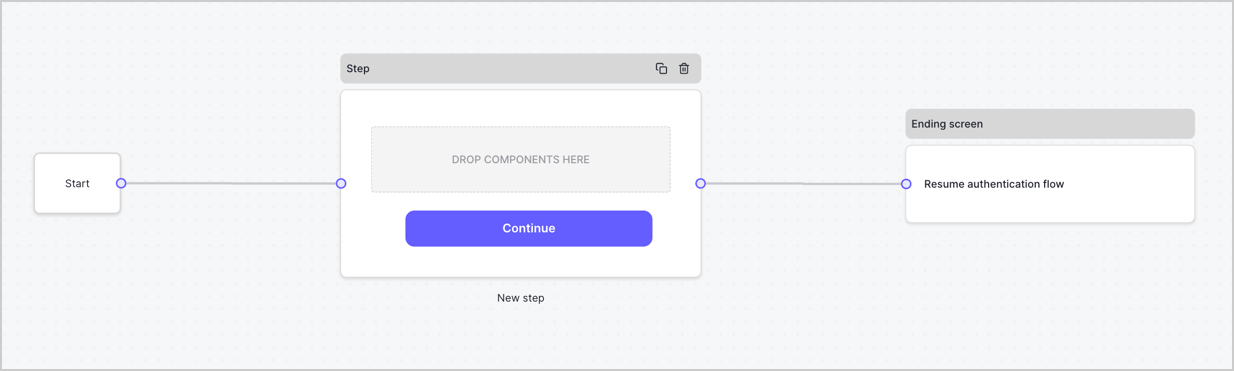
By default, a new form contains a Start node, a Step node, and an Ending screen node.
<Frame>
  <img src="https://mintcdn.com/docs-dev-fix-ss-log-app-metadata-user-metadata-clarification/7E_Iu1vhF4mliqIC/docs/images/cdy7uua7fh8z/2TZ9jSjgEcARFpULI6hz4R/a4319a1bd482f2ee5cc23100fdb2f42c/New-form-Forms-for-action-use-case.png?fit=max&auto=format&n=7E_Iu1vhF4mliqIC&q=85&s=966f3c9e78367063e5181282a6fae938" alt="Dashboard > Forms > Use Cases > Form" data-og-width="1234" width="1234" data-og-height="371" height="371" data-path="docs/images/cdy7uua7fh8z/2TZ9jSjgEcARFpULI6hz4R/a4319a1bd482f2ee5cc23100fdb2f42c/New-form-Forms-for-action-use-case.png" data-optimize="true" data-opv="3" srcset="https://mintcdn.com/docs-dev-fix-ss-log-app-metadata-user-metadata-clarification/7E_Iu1vhF4mliqIC/docs/images/cdy7uua7fh8z/2TZ9jSjgEcARFpULI6hz4R/a4319a1bd482f2ee5cc23100fdb2f42c/New-form-Forms-for-action-use-case.png?w=280&fit=max&auto=format&n=7E_Iu1vhF4mliqIC&q=85&s=5de1d5ba200e3fe11b908db58b53625c 280w, https://mintcdn.com/docs-dev-fix-ss-log-app-metadata-user-metadata-clarification/7E_Iu1vhF4mliqIC/docs/images/cdy7uua7fh8z/2TZ9jSjgEcARFpULI6hz4R/a4319a1bd482f2ee5cc23100fdb2f42c/New-form-Forms-for-action-use-case.png?w=560&fit=max&auto=format&n=7E_Iu1vhF4mliqIC&q=85&s=b7dbba7140aeb897a9fa05f3f32759d5 560w, https://mintcdn.com/docs-dev-fix-ss-log-app-metadata-user-metadata-clarification/7E_Iu1vhF4mliqIC/docs/images/cdy7uua7fh8z/2TZ9jSjgEcARFpULI6hz4R/a4319a1bd482f2ee5cc23100fdb2f42c/New-form-Forms-for-action-use-case.png?w=840&fit=max&auto=format&n=7E_Iu1vhF4mliqIC&q=85&s=92f84e13eeacf4223fcfd12f9177547a 840w, https://mintcdn.com/docs-dev-fix-ss-log-app-metadata-user-metadata-clarification/7E_Iu1vhF4mliqIC/docs/images/cdy7uua7fh8z/2TZ9jSjgEcARFpULI6hz4R/a4319a1bd482f2ee5cc23100fdb2f42c/New-form-Forms-for-action-use-case.png?w=1100&fit=max&auto=format&n=7E_Iu1vhF4mliqIC&q=85&s=a1ba386baf085875befa2ec9e7dbef5c 1100w, https://mintcdn.com/docs-dev-fix-ss-log-app-metadata-user-metadata-clarification/7E_Iu1vhF4mliqIC/docs/images/cdy7uua7fh8z/2TZ9jSjgEcARFpULI6hz4R/a4319a1bd482f2ee5cc23100fdb2f42c/New-form-Forms-for-action-use-case.png?w=1650&fit=max&auto=format&n=7E_Iu1vhF4mliqIC&q=85&s=3d39c25a40c2ac5acea51601ec33adff 1650w, https://mintcdn.com/docs-dev-fix-ss-log-app-metadata-user-metadata-clarification/7E_Iu1vhF4mliqIC/docs/images/cdy7uua7fh8z/2TZ9jSjgEcARFpULI6hz4R/a4319a1bd482f2ee5cc23100fdb2f42c/New-form-Forms-for-action-use-case.png?w=2500&fit=max&auto=format&n=7E_Iu1vhF4mliqIC&q=85&s=9585d12dd6a3c3bc7178010502c4fab1 2500w" />
</Frame>

### Configure the Step node

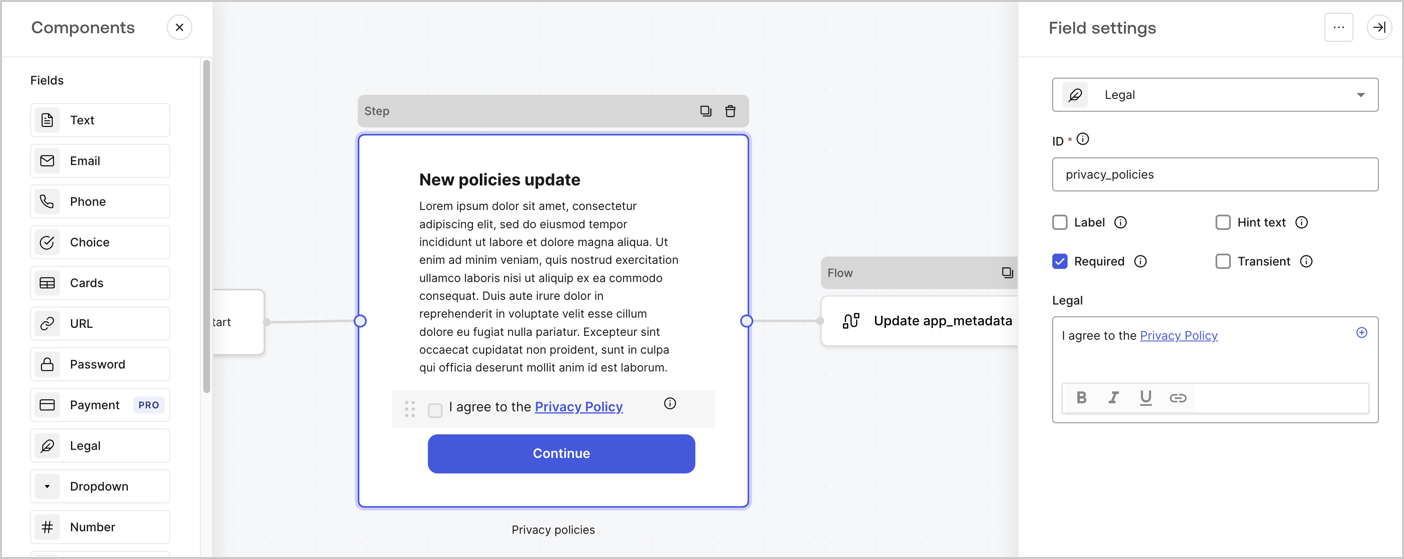
The Step node is the graphical interface visible to users. Add [Fields](/docs/customize/forms/nodes-and-components) to the Step node to collect the new agreement acceptance value by following these steps:

1. Drag a **Rich text** field from the **Components menu** into the **Step** node.

   * **Rich text**: Enter a description of your privacy policies updates.
   * Select **Save**.
2. Drag a **Legal** field into the **Step** node.

   * **ID**: Enter `privacy_policies`.
   * **Required**: Enable the checkbox.
   * **Legal**: Enter `I agree to the Privacy Policy`.
   * Select **Save**.
3. Select **Publish** to save.
<Frame>
  <img src="https://mintcdn.com/docs-dev-fix-ss-log-app-metadata-user-metadata-clarification/HVFV1Xr616dc6urt/docs/images/cdy7uua7fh8z/59zFFjQjAnjogkc2QGIqqJ/0ad66b1b636544122aa4e65968b76c2c/privacy-policy-step-node.png?fit=max&auto=format&n=HVFV1Xr616dc6urt&q=85&s=23f2d12e0e4b383542c7ab174e0ba2a2" alt="Dashboard > Actions > Forms > Use case privacy policy step node" data-og-width="1404" width="1404" data-og-height="559" height="559" data-path="docs/images/cdy7uua7fh8z/59zFFjQjAnjogkc2QGIqqJ/0ad66b1b636544122aa4e65968b76c2c/privacy-policy-step-node.png" data-optimize="true" data-opv="3" srcset="https://mintcdn.com/docs-dev-fix-ss-log-app-metadata-user-metadata-clarification/HVFV1Xr616dc6urt/docs/images/cdy7uua7fh8z/59zFFjQjAnjogkc2QGIqqJ/0ad66b1b636544122aa4e65968b76c2c/privacy-policy-step-node.png?w=280&fit=max&auto=format&n=HVFV1Xr616dc6urt&q=85&s=661728d06588924e4a71e591653fa5fd 280w, https://mintcdn.com/docs-dev-fix-ss-log-app-metadata-user-metadata-clarification/HVFV1Xr616dc6urt/docs/images/cdy7uua7fh8z/59zFFjQjAnjogkc2QGIqqJ/0ad66b1b636544122aa4e65968b76c2c/privacy-policy-step-node.png?w=560&fit=max&auto=format&n=HVFV1Xr616dc6urt&q=85&s=1f655189206a653605cb2fd65901d4cf 560w, https://mintcdn.com/docs-dev-fix-ss-log-app-metadata-user-metadata-clarification/HVFV1Xr616dc6urt/docs/images/cdy7uua7fh8z/59zFFjQjAnjogkc2QGIqqJ/0ad66b1b636544122aa4e65968b76c2c/privacy-policy-step-node.png?w=840&fit=max&auto=format&n=HVFV1Xr616dc6urt&q=85&s=1072ff90a1fabd7380d69c0acbed7c99 840w, https://mintcdn.com/docs-dev-fix-ss-log-app-metadata-user-metadata-clarification/HVFV1Xr616dc6urt/docs/images/cdy7uua7fh8z/59zFFjQjAnjogkc2QGIqqJ/0ad66b1b636544122aa4e65968b76c2c/privacy-policy-step-node.png?w=1100&fit=max&auto=format&n=HVFV1Xr616dc6urt&q=85&s=de2b3e84f516f90fe9307bae68bacb42 1100w, https://mintcdn.com/docs-dev-fix-ss-log-app-metadata-user-metadata-clarification/HVFV1Xr616dc6urt/docs/images/cdy7uua7fh8z/59zFFjQjAnjogkc2QGIqqJ/0ad66b1b636544122aa4e65968b76c2c/privacy-policy-step-node.png?w=1650&fit=max&auto=format&n=HVFV1Xr616dc6urt&q=85&s=660065c4c3ad18941addf54d585ff4c9 1650w, https://mintcdn.com/docs-dev-fix-ss-log-app-metadata-user-metadata-clarification/HVFV1Xr616dc6urt/docs/images/cdy7uua7fh8z/59zFFjQjAnjogkc2QGIqqJ/0ad66b1b636544122aa4e65968b76c2c/privacy-policy-step-node.png?w=2500&fit=max&auto=format&n=HVFV1Xr616dc6urt&q=85&s=06c4c38fbc121915e7c428c7b02cde0e 2500w" />
</Frame>

### Configure the Flow node

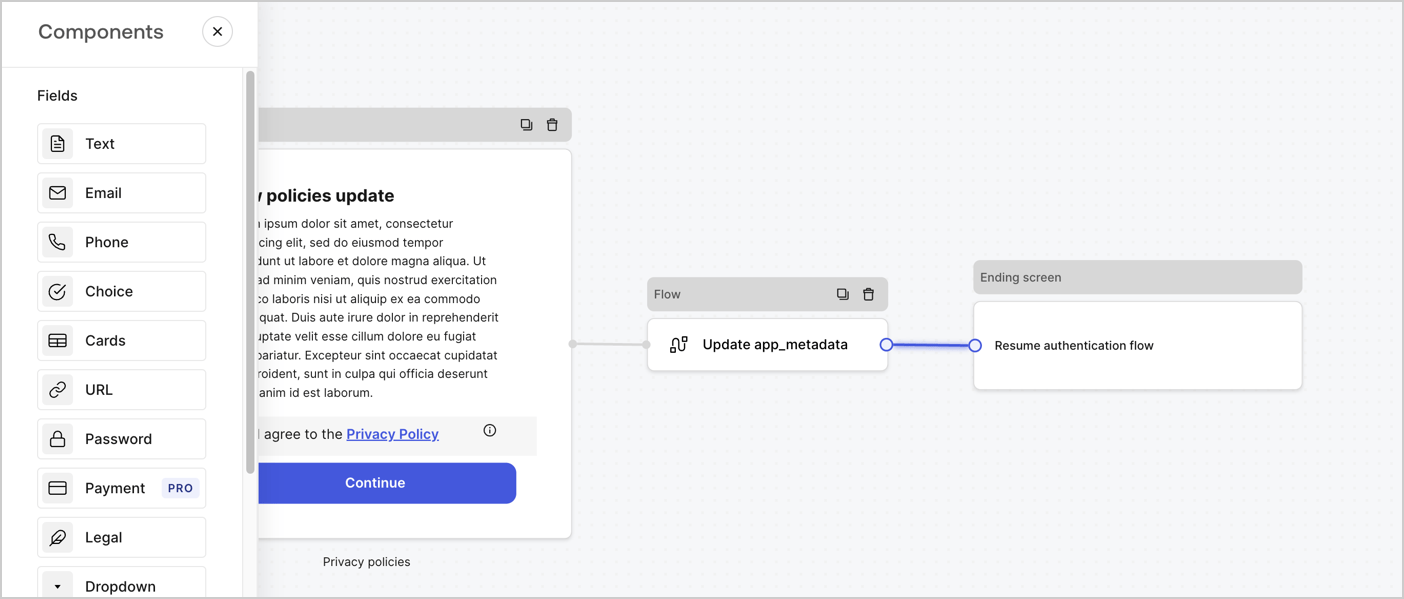
Add a **Flow** node after the **Step** node to update the `app_metadata` and resume the authentication flow by following these steps:

1. Select **Flow** from the bottom of the Form editor.
2. Remove the existing link between the **Step** and **Ending Screen** nodes.
3. Select the new **Flow** > **Click to add a flow** > **Create a new flow.**

   * Enter `Update app_metadata` in the **Name** field.
   * Select **Create**.
   * Select **Save**.
4. Link the **Flow** node to the **Step** and **Ending Screen** nodes as pictured below.
5. Select **Publish** to save.
<Frame>
  <img src="https://mintcdn.com/docs-dev-fix-ss-log-app-metadata-user-metadata-clarification/kea7N-eir4Zjm6iz/docs/images/cdy7uua7fh8z/6YIkzm7SrpM9LW76AXuRzh/353c518fe82bbaa440836da1d83596d6/link-policies.png?fit=max&auto=format&n=kea7N-eir4Zjm6iz&q=85&s=0f802d56b8502e1b7ed7c69382b51169" alt="Dashboard > Actions > Forms > Form" data-og-width="1404" width="1404" data-og-height="599" height="599" data-path="docs/images/cdy7uua7fh8z/6YIkzm7SrpM9LW76AXuRzh/353c518fe82bbaa440836da1d83596d6/link-policies.png" data-optimize="true" data-opv="3" srcset="https://mintcdn.com/docs-dev-fix-ss-log-app-metadata-user-metadata-clarification/kea7N-eir4Zjm6iz/docs/images/cdy7uua7fh8z/6YIkzm7SrpM9LW76AXuRzh/353c518fe82bbaa440836da1d83596d6/link-policies.png?w=280&fit=max&auto=format&n=kea7N-eir4Zjm6iz&q=85&s=83549a70dfe4731242b32c144836bc42 280w, https://mintcdn.com/docs-dev-fix-ss-log-app-metadata-user-metadata-clarification/kea7N-eir4Zjm6iz/docs/images/cdy7uua7fh8z/6YIkzm7SrpM9LW76AXuRzh/353c518fe82bbaa440836da1d83596d6/link-policies.png?w=560&fit=max&auto=format&n=kea7N-eir4Zjm6iz&q=85&s=a8ab670a26205953cf19e89430370c6f 560w, https://mintcdn.com/docs-dev-fix-ss-log-app-metadata-user-metadata-clarification/kea7N-eir4Zjm6iz/docs/images/cdy7uua7fh8z/6YIkzm7SrpM9LW76AXuRzh/353c518fe82bbaa440836da1d83596d6/link-policies.png?w=840&fit=max&auto=format&n=kea7N-eir4Zjm6iz&q=85&s=61e746822fe137a47903c77d42764731 840w, https://mintcdn.com/docs-dev-fix-ss-log-app-metadata-user-metadata-clarification/kea7N-eir4Zjm6iz/docs/images/cdy7uua7fh8z/6YIkzm7SrpM9LW76AXuRzh/353c518fe82bbaa440836da1d83596d6/link-policies.png?w=1100&fit=max&auto=format&n=kea7N-eir4Zjm6iz&q=85&s=34fb5132deab7492df2e03d47aac6c20 1100w, https://mintcdn.com/docs-dev-fix-ss-log-app-metadata-user-metadata-clarification/kea7N-eir4Zjm6iz/docs/images/cdy7uua7fh8z/6YIkzm7SrpM9LW76AXuRzh/353c518fe82bbaa440836da1d83596d6/link-policies.png?w=1650&fit=max&auto=format&n=kea7N-eir4Zjm6iz&q=85&s=e736e60d844058e3430cf91a0c79fb8f 1650w, https://mintcdn.com/docs-dev-fix-ss-log-app-metadata-user-metadata-clarification/kea7N-eir4Zjm6iz/docs/images/cdy7uua7fh8z/6YIkzm7SrpM9LW76AXuRzh/353c518fe82bbaa440836da1d83596d6/link-policies.png?w=2500&fit=max&auto=format&n=kea7N-eir4Zjm6iz&q=85&s=6b557527847d2a224031799a6c194d2e 2500w" />
</Frame>

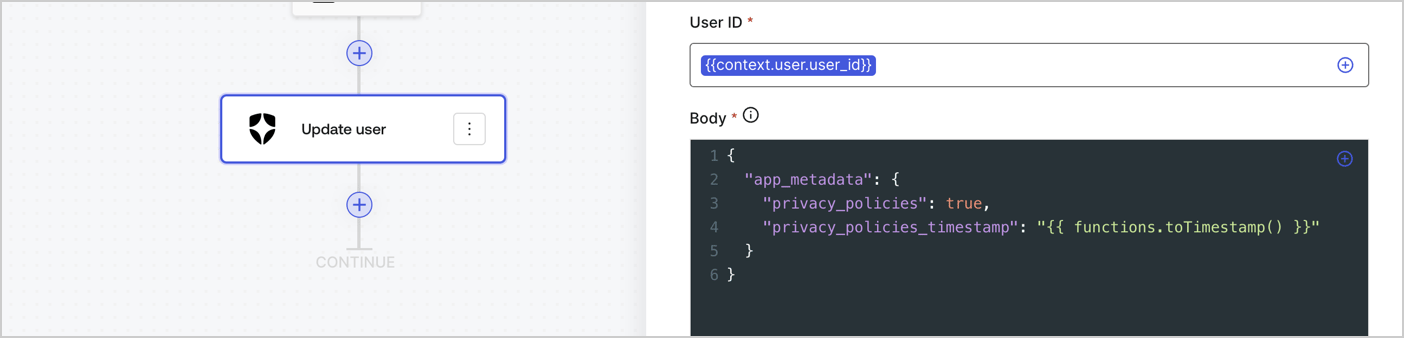
Add an Auth0 Update user action to the flow by following these steps:

1. Select the **Flow** **Update app\_metadata** > **Edit flow** to open the Flow editor in a new tab.
2. Below the StartAction, select the **+** icon to add an **Update user** action. Complete the fields below, then select **Save** to continue.

   * **Connection**: Select from the dropdown the Vault connection to your M2M application.

   * **User ID**: Enter `{{context.user.user_id}}`.

   * **Body**: Copy and paste the following code to update the app\_metadata with the privacy\_policies and privacy\_policies\_timestamp properties.

     ```text lines theme={null}
     {
       "app_metadata": {
         "privacy_policies": true,
         "privacy_policies_timestamp": "{{ functions.toTimestamp() }}"
       }
     }
     ```

   * Select **Save**.
3. Select **Publish** to save.
<Frame>
  <img src="https://mintcdn.com/docs-dev-fix-ss-log-app-metadata-user-metadata-clarification/ibeGqQihq2rjB8x9/docs/images/cdy7uua7fh8z/CvMNIwWrOUwaFW4X3G28p/1fb70ae57a20749d9ffaaba8dc0b7e26/update-user-privacy.png?fit=max&auto=format&n=ibeGqQihq2rjB8x9&q=85&s=4647f856b1f5563e07222cfb31bb4307" alt="Dashboard > Actions > Forms > User case privacy policy code" data-og-width="1404" width="1404" data-og-height="338" height="338" data-path="docs/images/cdy7uua7fh8z/CvMNIwWrOUwaFW4X3G28p/1fb70ae57a20749d9ffaaba8dc0b7e26/update-user-privacy.png" data-optimize="true" data-opv="3" srcset="https://mintcdn.com/docs-dev-fix-ss-log-app-metadata-user-metadata-clarification/ibeGqQihq2rjB8x9/docs/images/cdy7uua7fh8z/CvMNIwWrOUwaFW4X3G28p/1fb70ae57a20749d9ffaaba8dc0b7e26/update-user-privacy.png?w=280&fit=max&auto=format&n=ibeGqQihq2rjB8x9&q=85&s=03c025a6ee98cb4a55bb1cefe3958ed5 280w, https://mintcdn.com/docs-dev-fix-ss-log-app-metadata-user-metadata-clarification/ibeGqQihq2rjB8x9/docs/images/cdy7uua7fh8z/CvMNIwWrOUwaFW4X3G28p/1fb70ae57a20749d9ffaaba8dc0b7e26/update-user-privacy.png?w=560&fit=max&auto=format&n=ibeGqQihq2rjB8x9&q=85&s=5d48cc877b6cd4ff34239aec68e06bb1 560w, https://mintcdn.com/docs-dev-fix-ss-log-app-metadata-user-metadata-clarification/ibeGqQihq2rjB8x9/docs/images/cdy7uua7fh8z/CvMNIwWrOUwaFW4X3G28p/1fb70ae57a20749d9ffaaba8dc0b7e26/update-user-privacy.png?w=840&fit=max&auto=format&n=ibeGqQihq2rjB8x9&q=85&s=9127a171d6974309f841b693e3361bca 840w, https://mintcdn.com/docs-dev-fix-ss-log-app-metadata-user-metadata-clarification/ibeGqQihq2rjB8x9/docs/images/cdy7uua7fh8z/CvMNIwWrOUwaFW4X3G28p/1fb70ae57a20749d9ffaaba8dc0b7e26/update-user-privacy.png?w=1100&fit=max&auto=format&n=ibeGqQihq2rjB8x9&q=85&s=8d887cad52593c133a34da41b76320dc 1100w, https://mintcdn.com/docs-dev-fix-ss-log-app-metadata-user-metadata-clarification/ibeGqQihq2rjB8x9/docs/images/cdy7uua7fh8z/CvMNIwWrOUwaFW4X3G28p/1fb70ae57a20749d9ffaaba8dc0b7e26/update-user-privacy.png?w=1650&fit=max&auto=format&n=ibeGqQihq2rjB8x9&q=85&s=cfcc0fa78827bc64ffaf6e02c001e120 1650w, https://mintcdn.com/docs-dev-fix-ss-log-app-metadata-user-metadata-clarification/ibeGqQihq2rjB8x9/docs/images/cdy7uua7fh8z/CvMNIwWrOUwaFW4X3G28p/1fb70ae57a20749d9ffaaba8dc0b7e26/update-user-privacy.png?w=2500&fit=max&auto=format&n=ibeGqQihq2rjB8x9&q=85&s=6c91aa474bf91ef1b215298feeae1e24 2500w" />
</Frame>

<Callout icon="file-lines" color="#0EA5E9" iconType="regular">
  The flow **Update app\_metadata** adds a `privacy_policies true` value to the app`_metadata` object and also generates a timestamp with a [helper function.](/docs/customize/forms/variables)
</Callout>

## Retrieve the form render code

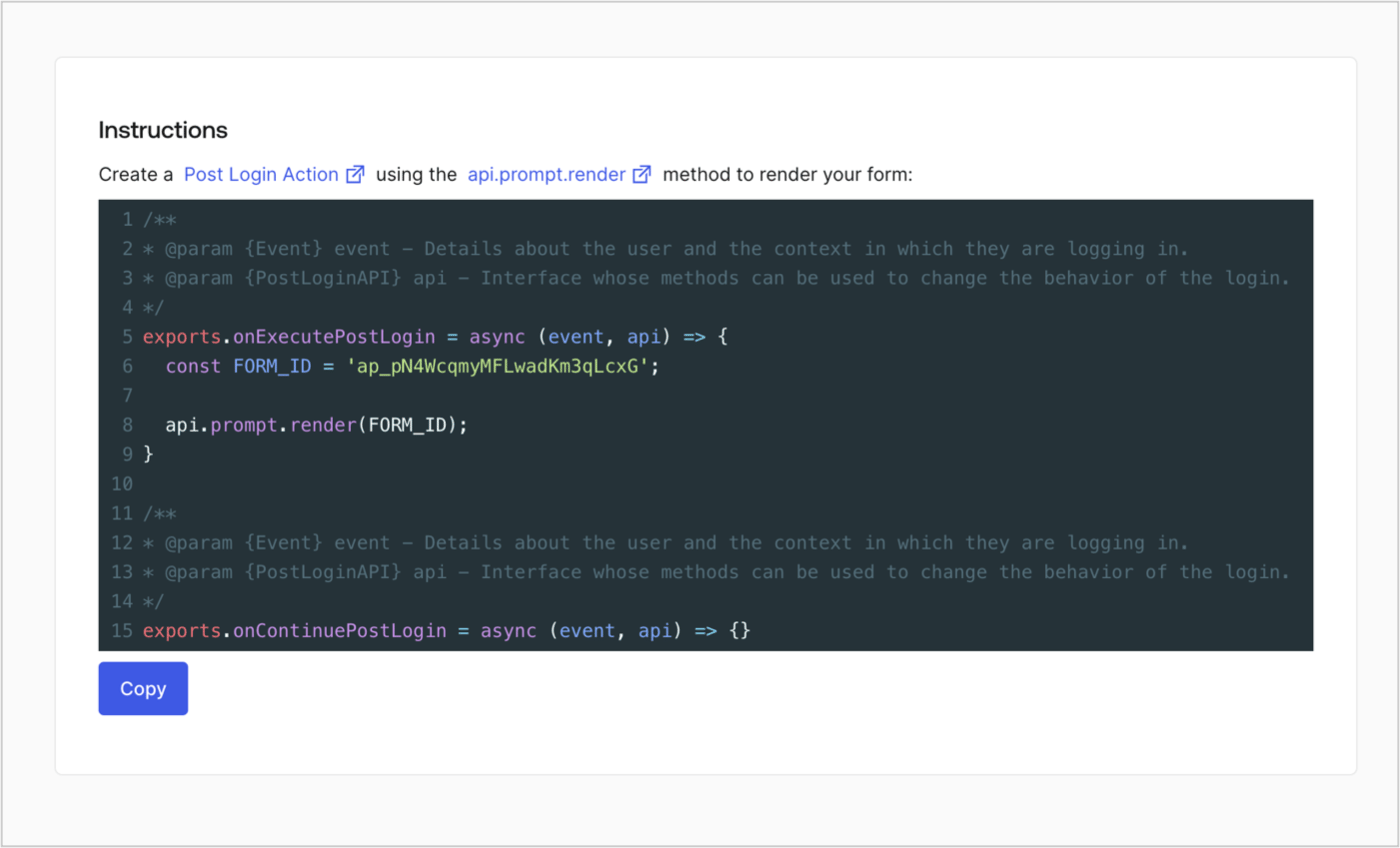
Retrieve your form render code to visually render the form with a custom Post Login Action by following these steps:

* From the Form editor, select **`<> Render`**.
* Select **Copy**.
<Frame>
  <img src="https://mintcdn.com/docs-dev-fix-ss-log-app-metadata-user-metadata-clarification/_-ecZoC-zidTtQ_x/docs/images/cdy7uua7fh8z/2EIUzc539sq9lwoTKbjoJv/496a864c0fc44a782c9cadca119dbfb0/embed.png?fit=max&auto=format&n=_-ecZoC-zidTtQ_x&q=85&s=22f3ea753fe686ab4c66f8450dee5e30" alt="Dashboard > Actions > Forms > Form > Embed" data-og-width="1400" width="1400" data-og-height="848" height="848" data-path="docs/images/cdy7uua7fh8z/2EIUzc539sq9lwoTKbjoJv/496a864c0fc44a782c9cadca119dbfb0/embed.png" data-optimize="true" data-opv="3" srcset="https://mintcdn.com/docs-dev-fix-ss-log-app-metadata-user-metadata-clarification/_-ecZoC-zidTtQ_x/docs/images/cdy7uua7fh8z/2EIUzc539sq9lwoTKbjoJv/496a864c0fc44a782c9cadca119dbfb0/embed.png?w=280&fit=max&auto=format&n=_-ecZoC-zidTtQ_x&q=85&s=0313ce65e3872e65b30b852a627f63c3 280w, https://mintcdn.com/docs-dev-fix-ss-log-app-metadata-user-metadata-clarification/_-ecZoC-zidTtQ_x/docs/images/cdy7uua7fh8z/2EIUzc539sq9lwoTKbjoJv/496a864c0fc44a782c9cadca119dbfb0/embed.png?w=560&fit=max&auto=format&n=_-ecZoC-zidTtQ_x&q=85&s=bc78dfe59c148a6d78c26a4ceeaa384a 560w, https://mintcdn.com/docs-dev-fix-ss-log-app-metadata-user-metadata-clarification/_-ecZoC-zidTtQ_x/docs/images/cdy7uua7fh8z/2EIUzc539sq9lwoTKbjoJv/496a864c0fc44a782c9cadca119dbfb0/embed.png?w=840&fit=max&auto=format&n=_-ecZoC-zidTtQ_x&q=85&s=d46287dca2fac594053322531a88db88 840w, https://mintcdn.com/docs-dev-fix-ss-log-app-metadata-user-metadata-clarification/_-ecZoC-zidTtQ_x/docs/images/cdy7uua7fh8z/2EIUzc539sq9lwoTKbjoJv/496a864c0fc44a782c9cadca119dbfb0/embed.png?w=1100&fit=max&auto=format&n=_-ecZoC-zidTtQ_x&q=85&s=12120761c0cb5b52c659bea6158b2993 1100w, https://mintcdn.com/docs-dev-fix-ss-log-app-metadata-user-metadata-clarification/_-ecZoC-zidTtQ_x/docs/images/cdy7uua7fh8z/2EIUzc539sq9lwoTKbjoJv/496a864c0fc44a782c9cadca119dbfb0/embed.png?w=1650&fit=max&auto=format&n=_-ecZoC-zidTtQ_x&q=85&s=ff4574165218f525a1f8b08a99c9e131 1650w, https://mintcdn.com/docs-dev-fix-ss-log-app-metadata-user-metadata-clarification/_-ecZoC-zidTtQ_x/docs/images/cdy7uua7fh8z/2EIUzc539sq9lwoTKbjoJv/496a864c0fc44a782c9cadca119dbfb0/embed.png?w=2500&fit=max&auto=format&n=_-ecZoC-zidTtQ_x&q=85&s=ca1ac72c119c061b8e4720801cbea9f4 2500w" />
</Frame>

## Create a Post Login Action

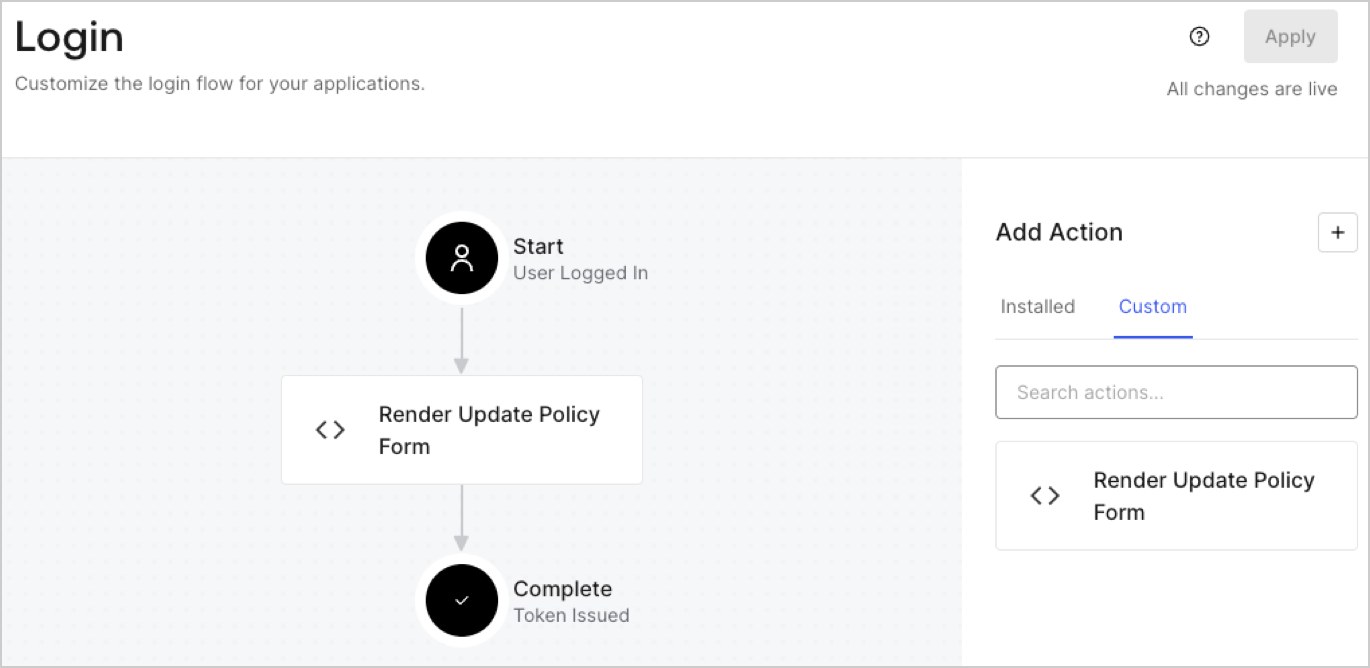
Create a post-login Action to render your form by following these steps:

1. Navigate to **Auth0 Dashboard > Actions > Flows > Login.**
2. Select the **+** icon and Select **Build from scratch**:

   * **Name**: Enter `Render Update Policy Form`.
   * **Trigger**: Select `Login / Post Login`.
   * **Runtime**: Select the recommended version.
3. Select **Create**.

To configure the post-login Action:

1. Delete the existing code from the Code editor.
2. Paste the form render code into the Code editor.
3. Edit the code to define the conditional logic that will render the form.

   ```javascript lines theme={null}
   /**
   * @param {Event} event - Details about the user and the context in which they are logging in.
   * @param {PostLoginAPI} api - Interface whose methods can be used to change the behavior of the login.
   */
   exports.onExecutePostLogin = async (event, api) => {
     const FORM_ID = 'REPLACE_WITH_YOUR_FORM_ID';

     if (event.user.app_metadata.privacy_policies !== true) {
       api.prompt.render(FORM_ID);
     }
   }

   exports.onContinuePostLogin = async (event, api) => { }
   ```

   <Callout icon="file-lines" color="#0EA5E9" iconType="regular">
     The example code above will render the form when a user is missing the app metadata `privacy_policies` property.
   </Callout>
4. Select **Deploy.**
5. Drag and Drop the **Render Update Policy Form** Action to the **Login** flow.
   <Frame>
     <img src="https://mintcdn.com/docs-dev-fix-ss-log-app-metadata-user-metadata-clarification/A58d2BA36_kazioB/docs/images/cdy7uua7fh8z/5TOwDgevZsBqd7yZynUYWU/41ca909dc3007aed4f40ff794a05efa5/postlogin.png?fit=max&auto=format&n=A58d2BA36_kazioB&q=85&s=5e3676faa5e5ded9178c8c3e44c6d146" alt="Dashboard > Forms > Use Case > Render update policy form login action" data-og-width="1370" width="1370" data-og-height="668" height="668" data-path="docs/images/cdy7uua7fh8z/5TOwDgevZsBqd7yZynUYWU/41ca909dc3007aed4f40ff794a05efa5/postlogin.png" data-optimize="true" data-opv="3" srcset="https://mintcdn.com/docs-dev-fix-ss-log-app-metadata-user-metadata-clarification/A58d2BA36_kazioB/docs/images/cdy7uua7fh8z/5TOwDgevZsBqd7yZynUYWU/41ca909dc3007aed4f40ff794a05efa5/postlogin.png?w=280&fit=max&auto=format&n=A58d2BA36_kazioB&q=85&s=a3069489257935acf53227fdde69c59e 280w, https://mintcdn.com/docs-dev-fix-ss-log-app-metadata-user-metadata-clarification/A58d2BA36_kazioB/docs/images/cdy7uua7fh8z/5TOwDgevZsBqd7yZynUYWU/41ca909dc3007aed4f40ff794a05efa5/postlogin.png?w=560&fit=max&auto=format&n=A58d2BA36_kazioB&q=85&s=89c1adcad2a2c47826257777eb228cd4 560w, https://mintcdn.com/docs-dev-fix-ss-log-app-metadata-user-metadata-clarification/A58d2BA36_kazioB/docs/images/cdy7uua7fh8z/5TOwDgevZsBqd7yZynUYWU/41ca909dc3007aed4f40ff794a05efa5/postlogin.png?w=840&fit=max&auto=format&n=A58d2BA36_kazioB&q=85&s=3c780b67f66223a6e862638e1f6309d3 840w, https://mintcdn.com/docs-dev-fix-ss-log-app-metadata-user-metadata-clarification/A58d2BA36_kazioB/docs/images/cdy7uua7fh8z/5TOwDgevZsBqd7yZynUYWU/41ca909dc3007aed4f40ff794a05efa5/postlogin.png?w=1100&fit=max&auto=format&n=A58d2BA36_kazioB&q=85&s=027c2b7d85290a05dcc68b69b8b232d3 1100w, https://mintcdn.com/docs-dev-fix-ss-log-app-metadata-user-metadata-clarification/A58d2BA36_kazioB/docs/images/cdy7uua7fh8z/5TOwDgevZsBqd7yZynUYWU/41ca909dc3007aed4f40ff794a05efa5/postlogin.png?w=1650&fit=max&auto=format&n=A58d2BA36_kazioB&q=85&s=e6a0750553bcdd4069ead3002cf7e62c 1650w, https://mintcdn.com/docs-dev-fix-ss-log-app-metadata-user-metadata-clarification/A58d2BA36_kazioB/docs/images/cdy7uua7fh8z/5TOwDgevZsBqd7yZynUYWU/41ca909dc3007aed4f40ff794a05efa5/postlogin.png?w=2500&fit=max&auto=format&n=A58d2BA36_kazioB&q=85&s=06fd8b6aebf917964e25869f60790a8e 2500w" />
   </Frame>
6. Select **Apply.**

### Test implementation

Test the implementation by following these steps:

1. Log in with an existing user whose app`_metadata` attribute `privacy_policies` does not have a value.
2. The post-login Action in the Login flow will render the form and prompt for acceptance.
3. Select **Auth0 Dashboard > User Management > Users,** locate the user and verify that the `app_metadata` attribute `privacy_policies` contains a `true` value and a timestamp.
